How to Scale Residential Property Accounting Without Hiring More Staff
- September 28, 2026
- OHI
Growth is good news — until the paperwork catches up. If you manage residential rentals, you already know the feeling: every new door means more invoices, more owner statements, and more late-night bank reconciliations. The usual answer is hiring, but a full-time bookkeeper costs $45,000–$65,000 a year before benefits. This guide shows you how to handle more properties with the team you already have, using better systems, smart automation, and selective outsourcing.
You scale residential property accounting without hiring by
(1) standardizing your chart of accounts,
(2) automating repetitive tasks like invoicing, bank reconciliation, and owner statements,
(3) batching accounting work into fixed weekly schedules
(4) outsourcing overflow to fractional or offshore bookkeepers. Together, these steps typically cut accounting workload by 40–60% per door.
Most people think scaling means doing the same work faster. In accounting, it really means making the work proportional so that going from 50 to 150 units doesn’t triple your back office. The goal is simple: the cost and hours spent on accounting per unit should go down as your portfolio grows, not up.
That only happens when your processes are standardized and repeatable. If every property is handled a little differently, every new door adds complexity instead of just volume. Standardization is the quiet foundation everything else in this guide is built on.
Before you post that job listing, look at what one full-time bookkeeper really costs. Salary is just the starting point.
| Cost Item | Full-Time Hire | Fractional Outsourcing | Automation Software |
|---|---|---|---|
| Base cost | $45,000–$65,000/yr | $500–$1,500/mo | $50–$300/mo |
| Benefits & taxes | +20–30% | $0 | $0 |
| Training & onboarding | 2–4 weeks | A few days | Self-serve |
| Turnover risk | High (avg. tenure under 2 yrs) | None for you | None |
| Scales with portfolio? | Poorly | Yes | Yes |
For many residential portfolios under roughly 300 units, a full-time hire is overkill. You end up paying a full salary for what is often 10–20 hours of real accounting work a week. Outsourcing or automation fills that gap at a fraction of the cost and you can always hire later, once the systems are in place.
A messy chart of accounts is the root of most accounting pain. When every property codes expenses differently one calls it “repairs,” another “maintenance” your reports become meaningless and month-end becomes a cleanup project.
Build one clean, property-agnostic chart of accounts and apply it to every unit. Use consistent naming, limit accounts to what you actually report on, and map every recurring transaction type to a default account. Most modern accounting tools let you save these rules so transactions auto-categorize. This single step often saves several hours every single month, and it makes automation far more accurate later.
“You can’t automate chaos. Fix the process first, then let software do the heavy lifting.”
Roughly 80% of residential property accounting involves the same handful of tasks repeated over and over. These are perfect automation targets because the rules are fixed: rent is due on the first, late fees follow a formula, and owner statements follow a template. For property managers, outsourcing property management can further streamline these repetitive accounting tasks, reduce manual work, and give teams more time to focus on property operations and growth.
Here is where the hours actually go — and what automation gives back:
| Task | Manual Time (Monthly) | Automated Time | How |
|---|---|---|---|
| Rent invoicing & reminders | 5–7 hrs | ~15 min | Recurring invoices + auto-reminders |
| Bank reconciliation | 4–6 hrs | 45–60 min | Automatic bank feeds + matching rules |
| Owner statements | 6–8 hrs | 30 min | Templated, auto-generated reports |
| Receipt & invoice entry | 3–4 hrs | 20 min | Receipt scanning with OCR capture |
| Late fee calculation | 1–2 hrs | 0 | Rule-based auto-charges |
When evaluating software, don’t get distracted by feature lists. The five capabilities that matter most for residential accounting are automatic bank feeds, recurring transaction rules, tenant and owner portals, document capture, and report templates. Everything else is nice to have.
Context switching is the silent killer of accounting productivity. Jumping between a maintenance call, a lease question, and a reconciliation breaks focus and doubles the time everything takes.
Instead, assign fixed accounting days. For example: Monday for invoicing and payment processing, Wednesday for payables and reconciliations, and Friday for reporting and owner communications. Group similar tasks, close your email during these blocks, and protect the time like it’s a client meeting. Property managers who batch their accounting routinely report finishing in 3–4 focused days what used to spill across the entire week.
If you want a template, here’s a simple weekly rhythm that works for most portfolios:
| Day | Accounting Focus |
|---|---|
| Monday | Invoice processing, rent payments, delinquency follow-ups |
| Wednesday | Vendor payables, bank reconciliations, receipt capture |
| Friday | Owner statements, KPI review, close-out checklist |
A monthly close checklist turns closing the books from an improvised scramble into a predictable routine. It also means anyone — you, a teammate, or an outsourced bookkeeper — can run it the same way every time.
A solid residential close includes: reconciling every bank and credit account, reviewing uncategorized transactions, posting accruals for unpaid invoices, verifying late fees and tenant balances, generating owner statements, and locking the period once everything checks out. Print it, save it, and refine it each quarter. A consistent close usually shrinks from 5–7 days down to 2–3 as the checklist matures.
Read more: – Best Practices in Month-End Closing: A Practical Guide for Finance Teams
Automation handles volume, but some work still needs human judgment — trust accounting questions, unusual transactions, owner escalations. That’s where fractional or offshore bookkeeping shines. You get experienced eyes on your books for a set number of hours a month, without a salary, benefits, or turnover risk.
The key is to keep control of the review. Outsourced bookkeepers record and reconcile; you review the final reports and approve anything unusual. This division of labor means the outsourced work is also cheaper, because you’ve already built clean processes and checklists for them to follow.
“Hire systems before you hire people. Software doesn’t call in sick, and a good checklist doesn’t quit.”
Accounting workload is driven as much by late payments as by transaction volume. Every missed rent payment creates extra entries, extra reminders, and extra owner explanations. Tightening collections upstream reduces the accounting burden downstream.
Start with online payment options and automatic reminders before the due date. Then automate late fees so they’re applied consistently — inconsistency is both a revenue leak and a fair-housing risk. Track delinquency by property and by week, not just monthly, so you can spot problem patterns early. Portfolios that automate reminders and late fees typically see delinquency drop within two or three months.
You don’t need the fanciest platform — you need one that fits your size today and your size in two years. Evaluate options against real workflows, not demo screens.
Use this scorecard when comparing tools:
| Criterion | Why It Matters |
|---|---|
| Automatic bank feeds | Eliminates manual statement downloads |
| Rules-based categorization | Learns your patterns over time |
| Owner & tenant portals | Cuts email and statement chasing |
| Scalable pricing per unit | Cost stays predictable as you grow |
| Exportable data | Avoids lock-in if you switch later |
| Permission controls | Protects trust accounts and approvals |
Whatever you choose, run one full parallel month-end before committing. Real data beats a sales demo every time.
More doors mean more money moving through your books — and more scrutiny. Residential accounting often involves owner funds held in trust, which means regulators care how those accounts are handled.
Set role-based permissions so no single person can record, approve, and move money alone. Enable two-factor authentication on every financial account, review user access quarterly, and keep an audit trail of any manual changes to transactions. These habits are cheap to build early and painful to retrofit after a problem.
You can’t improve what you don’t measure. A small set of accounting KPIs tells you early when things are slipping — long before owners or auditors notice.
| KPI | Healthy Target | What It Tells You |
|---|---|---|
| Days to close | Under 5 business days | Efficiency of your process |
| Delinquency rate | Under 3–5% | Collections effectiveness |
| Cost per door (accounting) | Trending down | Whether you’re truly scaling |
| Uncategorized transactions | Near zero | Data hygiene and automation accuracy |
| Reconciliation exceptions | Declining month over month | Bank feed and matching rule health |
Review these monthly, right after the close. If days-to-close is creeping up, something in the workflow broke — find it before you add more doors.
Your accounting setup shouldn’t look the same at 50 units as it does at 400. Plan the transitions before they sneak up on you.
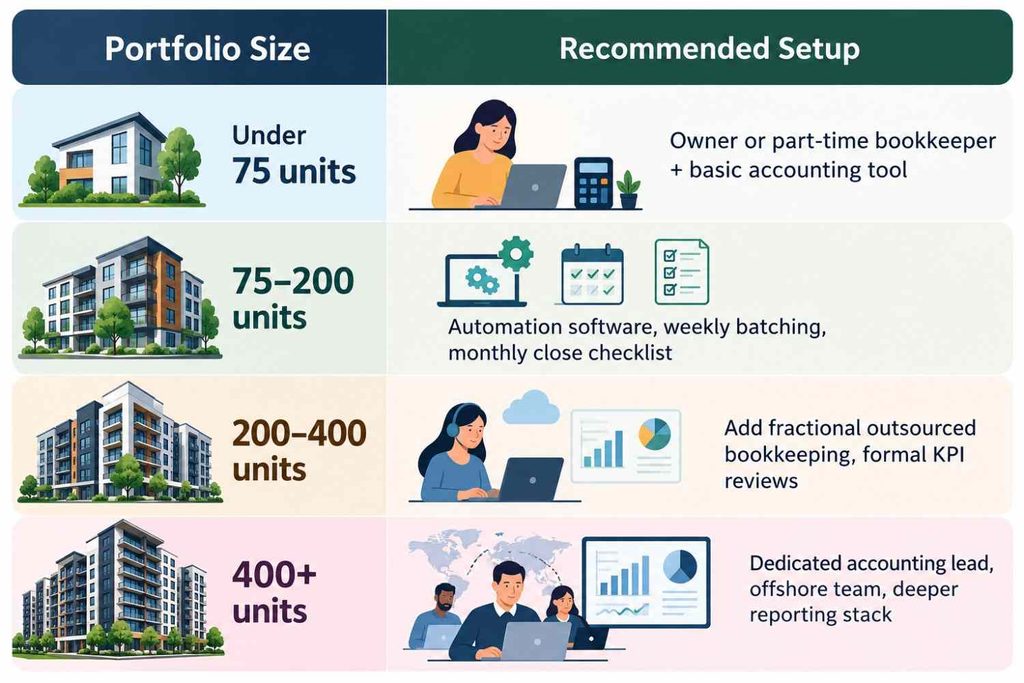
Big changes fail when they happen all at once. A staged rollout keeps your daily operations running while the new system takes shape.
| Phase | Timeline | Actions |
|---|---|---|
| Foundation | Days 1–30 | Clean chart of accounts, fix duplicate vendors, set batching schedule |
| Automation | Days 31–60 | Connect bank feeds, build categorization rules, automate invoicing and reminders |
| Hardening | Days 61–90 | Run parallel close, add KPI reviews, document the monthly checklist, assign owners to each task |
By day 90, you should have a documented, mostly automated close that runs the same way every month — regardless of who is in the office that week.
You don’t need a three-month project to start seeing relief. Three small actions produce noticeable savings almost immediately.
First, turn on automatic bank feeds in your accounting tool if you haven’t already — most setups take under an hour. Second, write down your monthly close steps, even roughly. The act of writing them exposes the gaps you didn’t know you had. Third, automate rent reminders five days before the due date. It’s a five-minute configuration that regularly cuts late payments within the first billing cycle.
Small, boring improvements compound. That’s the entire philosophy of scaling without hiring.
Even good intentions go wrong in predictable ways. Here are the big ones.
First, automating a broken process. If your categories are inconsistent or your data is full of duplicates, automation just makes the mess faster. Clean up first. Second, mixing personal and business spending. One shared card can poison months of clean records. Third, skipping the monthly close “just this once” — small gaps compound into year-end nightmares. Finally, choosing software for features you’ll never use instead of the core capabilities listed above. Simple and reliable beats flashy every time.
Scaling residential property accounting without hiring isn’t about finding one magic tool — it’s about stacking small, boring systems until the workload stops growing with your portfolio. Standardize the chart of accounts first, automate the repetitive 80%, batch the work into a fixed weekly rhythm, tighten collections upstream, and let fractional bookkeepers handle the judgment calls while you keep final review. None of these steps is difficult on its own. The hard part is doing them in the right order and staying consistent for ninety days.
But the payoff is real: each new door adds revenue without adding hours, payroll stress, or the risk of a bad hire. Your reports get cleaner, your owners get happier, and month-end stops eating your weekends.
So start small this week. Open your chart of accounts, clean up the first ten categories, and write down your current close steps. That one focused afternoon sets the foundation for everything else in this guide and it doesn’t cost you a single dollar or a single new employee.
How many doors can one person handle with automation?
With solid systems, one trained person can typically manage accounting for 150–300 residential units, depending on payment complexity and how much is outsourced. Without systems, that number often drops below 100.
Is outsourced bookkeeping safe for trust accounts?
Yes, when set up correctly. Give bookkeepers recording and reconciling access, keep approval and money-movement permissions in-house, and require two-step verification on all accounts.
What’s the first thing I should automate?
Bank reconciliation. It delivers the biggest time savings immediately and creates the clean transaction data every other automation depends on.
How long does the transition to automated accounting take?
Most portfolios complete the transition in 4–8 weeks: two weeks to clean the chart of accounts and data, two to four weeks to configure rules and test, then a parallel run of one month-end before fully switching over.
Does automation replace my accountant or CPA?
No — it makes them more valuable. Routine work gets automated, so your CPA spends time on tax strategy, entity structure, and year-end filings instead of data entry you could have avoided.
When should I finally hire a full-time bookkeeper?
Usually around 300–400 units, or when trust accounting complexity, owner volume, or multi-entity reporting starts outpacing what a fractional arrangement can handle. Let the KPIs — especially days-to-close — tell you when.